Choosing an editor
The AI button isn’t the whole editor
Bhippi, Premiere, Resolve, Descript, CapCut and AI plugins: what helps after the demo, what costs extra, and which trade-offs are worth making.


The rough cut looks promising. The dead air is gone, the captions have appeared, and the opening has some energy. Then you watch it properly. A useful hesitation has disappeared. The product name is wrong in two captions. The music rises over the one sentence the audience needs to hear.
Nothing catastrophic has happened. It is just a normal edit. But this is where an AI editor becomes interesting: can you fix those three things quickly, understand what changed, and keep the parts that worked?
That question is more useful than asking which app has the longest AI feature list. Almost every serious editor now has some AI. Some have excellent specialised tools. Some let you talk to an assistant. Some can generate media as well as cut it. The differences show up in how those pieces work together, what they cost, and how much control you have after the first result.
This is a comparison from Bhippi, so our interest is plain. We make an AI-first Windows editor. We also think you deserve a fair account of Premiere, Resolve, CapCut, Descript and the plugins people use with them. This article draws on current vendor documentation, a relevant research paper, community discussion and inspection of Bhippi 1.0.9. It is not a timed head-to-head test, and the example jobs below are illustrative. [15]
What people are actually frustrated about
Public editing discussions often return to the same practical tension: automation can save repetitive work, but correcting its choices can consume the saving. In one recent thread, people distinguish helpful transcript and silence tools from the harder decision of choosing the moments that carry a story. Those are individual views, not a measurement of every creator's experience. Still, they suggest a better way to evaluate the next tool you try. [14]
Think about a ten-minute interview that needs to become a one-minute film. Removing pauses helps. It does not decide whether the speaker's second answer is more convincing than the first, whether the cut changes their meaning, or whether the opening gives a stranger enough context. Those decisions remain your responsibility, whichever software performs the cuts.
Another frustration is fragmented work. You draft a brief in one place, generate a voice in another, make captions elsewhere, then import everything into an editor. A revised sentence means revisiting several tools. This is our workflow observation, not a claim that every competitor requires the same number of steps. An integrated product can reduce some of that coordination, but only if its revision controls are useful.
Then there is the bill: the editor, the plugin, stock media, storage and AI usage may be separate purchases. A tool can be worth every rupee and still be the wrong commitment for someone who edits twice a month. Keep capability, cost and fit in the same conversation.
AI features, AI plugins and an AI-first editor
Built-in AI usually lives inside a familiar task. Search for a shot, transcribe an interview, clean dialogue or extend a clip. The feature can be powerful without becoming the organising principle of the application. Premiere and Resolve have substantial native AI; describing them as editors with no AI would be inaccurate. [1] [4]
A plugin adds a workflow to a host editor. FireCut and AutoCut, for example, offer a range of automations inside Premiere or Resolve. Their advantage is often continuity: you keep the editor, shortcuts, project format and finishing tools you already know. The output can remain editable in the host timeline. A plugin does not automatically mean a flattened video or less control. [10] [11]
An AI-first editor puts the assistant closer to the whole job. In Bhippi, the chat, production planning, editable timeline and motion tools are part of the same application. A connected model can work through Bhippi's editing tools, while you can inspect and adjust the result by hand. The purpose is a shorter path from a brief to a project you can keep working on. [15]
This category is not exclusive to us. Descript's Underlord is also a native conversational video agent, and its documentation describes writing, editing and responding to feedback. CapCut offers broad built-in AI workflows too. “AI-first” needs an explanation of the workflow, not a claim that nobody else has thought of it. [7] [9]
The useful distinction is scope. Does the assistant understand the request in the context of the active project? Which operations can it perform? Where do its changes land? What can you undo? Ask those questions before accepting a marketing label.
What Bhippi provides in that workflow
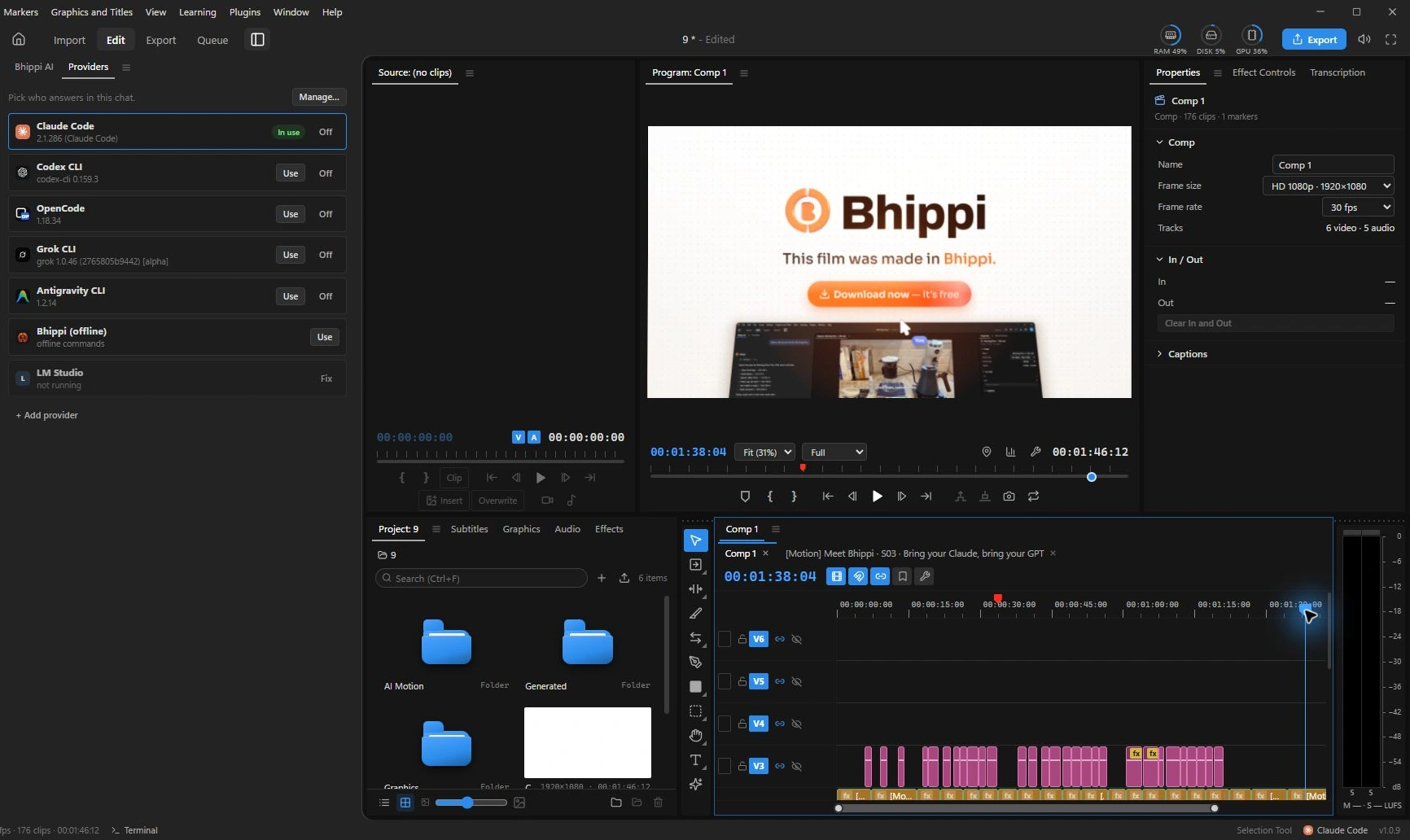
Bhippi combines an ordinary editing workspace with an AI conversation and a production process. You can work with multiple video and audio tracks, titles and motion graphics, then ask for assistance with a particular task. The AI acts through application tools on the project; editing operations enter the same undoable workflow used by manual editing. That makes the timeline a place to review the work rather than just a picture of what the assistant might have done. [15]
For larger requests, Bhippi's production route separates planning, gathering material and editing. A plan can include a script, shot list, graphics and audio before work moves into production. This is useful when the brief is more substantial than “remove the pauses.” It also adds decisions and checkpoints, which some people will prefer and others will find slower than a narrow one-click command.
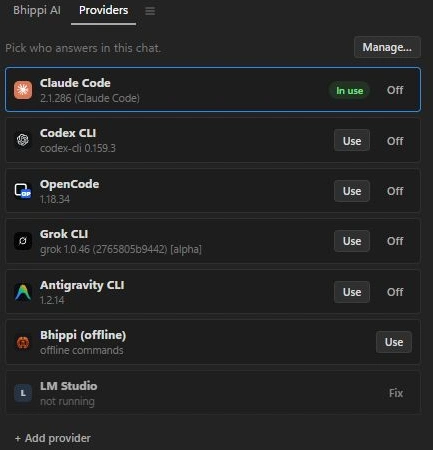
Provider choice is another part of the design. You connect your AI providers instead of assuming one bundled model must handle every job. Supported routes include coding-agent providers, compatible APIs and local model servers. Their availability, authentication and terms still apply. An assistant's ability to make a good edit depends on the model, the brief, the footage and the tools it can use; merely connecting a provider does not guarantee a polished film.
Bhippi also includes motion workflows, a built-in Characters workspace and its own plugin system with a Plugin Maker. This means you can extend Bhippi itself as well as use the editor. It does not mean Premiere or Resolve plugins install in Bhippi. Those are separate ecosystems, and a plugin designed for one host should not be assumed to work in another.
The screenshots in this article come from the real current application, captured on October 1, 2026. They show the product's actual workspace, not an AI-generated approximation. The image at the top is generated editorial photography to introduce the subject. Neither kind of image is proof that an assistant will make the right creative choice on your footage.
Premiere: a strong editor with a commitment to price in
Premiere is a sensible choice when it is already central to your work. Its native AI includes transcript-based cutting and generative features, and Adobe documents an on-device visual-search system for finding footage. If your biggest problem is locating a shot in a large media collection, that kind of targeted feature may be more useful than asking a general assistant to make the whole video. [1] [2]
The strength is the wider workflow: your team may already exchange Premiere projects, use After Effects compositions, rely on familiar effects and have a working review process. Switching editors also means moving those habits and dependencies. That is a real cost even when the new license is free. Evaluate it on an ordinary job, not on how exciting the new interface looks.
The obvious drawback for an occasional editor is the subscription commitment. Adobe's US guidance distinguishes an annual plan paid monthly from a genuine month-to-month plan. For the annual plan paid monthly, cancellation after the initial 14 days incurs half the remaining contract balance. That is a specific policy, not a rule for all plans or countries; read your regional terms. [3]
Bhippi's alternative is an early-access tester license you can keep free for life, with connected AI costs separate. That can make experimentation easier for a student or solo creator. It does not make Bhippi a drop-in replacement for a production team's Adobe pipeline, and it does not make an established Premiere subscription a bad decision if it earns its keep.
Resolve: free editing is already a serious option
Any honest comparison needs to acknowledge Resolve's free edition. Blackmagic combines editing, color, Fusion motion work and Fairlight audio in one application; Studio adds Neural Engine features and other advanced capabilities. The US Studio page listed $295 when checked. That is a dated regional reference, so confirm the amount and terms where you buy. [4] [5]
Resolve's appeal goes beyond price. If color finishing, audio post-production, collaboration or specialised delivery dominates your work, those requirements deserve priority. They may matter far more than whether you can begin a request in chat. Bhippi should not claim equal depth in every professional finishing task simply because it has an editable timeline.
Resolve also has AI-assisted assembly. Blackmagic's current what's-new page describes IntelliScript support for matching screenplay text to transcribed audio and assembling a timeline, with ordinary editing available afterward. You should check the edition and release that supports the feature you need. The claim that only Bhippi can turn instructions into an editable sequence would be too broad. [6]
The trade-off is fit. Resolve's substantial workspace can take time to learn, particularly if your goal is a small promotional video rather than a finishing workflow. Bhippi may be attractive when you want conversational assistance and provider choice close to a simpler production brief. Resolve may be the better answer when the finishing requirements are already clear. Try both on your own footage before deciding.
Descript: a direct comparison, not a token mention
Descript deserves a real place in this article because it challenges the easy “traditional editors versus AI-first Bhippi” story. Underlord is built into Descript and accepts natural-language instructions. The product also centres text-based editing, which can be a comfortable way to work through interviews, podcasts, training videos and other speech-led material. [7]
If you think in paragraphs rather than clip handles, editing the transcript may feel natural. That does not remove the need to listen at each cut. A sentence that reads cleanly can still sound abrupt, and a good pause is sometimes part of the performance. The transcript is a useful view of the recording, not a substitute for the recording.
Descript's plans separate media allowances from AI credits. Its pricing documentation says media hours track uploaded or recorded media, while credits track AI feature usage. Export resolution, watermark policy and access differ by plan. This is not inherently unreasonable: bundled services can be convenient. It does mean you should budget for the amount of raw material and AI work you actually expect. [8]
Bhippi's different proposition is a Windows timeline and motion workspace where you connect your AI providers, including local options when properly configured. That may suit someone who wants to choose their model and work with graphics alongside the cut. Descript may suit someone who values its speech-led workflow and bundled service. Neither product's native assistant makes review optional.
CapCut: convenience matters, but check the exact workflow
CapCut's desktop documentation lists script-to-video, reframing and automatic captions, among other AI tools. It should not be dismissed as having only templates. For many creators, the attraction is that common social-video tasks are close at hand and can be tried without building a separate production system. [9]
The question is whether your actual deliverable stays convenient. Import your usual footage, apply the assets and effects you need, then reach the export screen. Verify which features require a plan or credits on that account and version. Also check regional availability. A screenshot from someone else's tutorial may not describe the product you can use today.
For a phone-centred workflow, check whether a Windows desktop tool fits how you shoot and publish. Bhippi's current public download is for Windows; a free license does not help if you need to edit on a different platform. For desktop work with a connected assistant, Bhippi's provider choice and project-centred production route may be more relevant. Choose the workflow you can repeat, rather than the most impressive list of effects.
AI plugins can be the right answer
FireCut lists silence removal, captions, B-roll, zooms, chapters and podcast workflows for supported host editors. AutoCut lists a similarly broad collection of named automations, including repeated-take removal and reframing. They are more than “an AI plugin that cuts silence.” Read the host-specific feature list, because the same brand name does not guarantee identical functions in Premiere and Resolve. [10] [11]
Cutback's Premiere Assistant adds transcript editing, captions and silence removal. Its plan documentation also lists automatic rough cutting, labelled beta. That matters when evaluating scope: even plugins can reach beyond one small operation. Check the limits and release status of the particular feature, rather than assuming an advertised capability is unlimited or fully mature. [12]
If your problem is narrow, a plugin can be an excellent fit. Suppose you already finish every podcast in Resolve and need help cutting dead air and switching camera angles. Keeping the established project and adding focused automation may involve less disruption than learning a new editor. The plugin's recurring price can still be worthwhile if it removes a bottleneck you encounter every week.
The trade-off is another dependency. You need a supported host, a compatible plugin version and the relevant license or service. When comparing cost, include both the host and the plugin; when testing, try reopening the project and revising the plugin's result. Do not judge only the first application of an effect.
Bhippi's advantage is a broader assistant already within the editor, paired with its own production and motion tools. You can ask for work across parts of the project without first choosing a separate plugin for each task. The limitation is ecosystem maturity. We cannot honestly claim that Bhippi's newer plugin system replaces the breadth of established host integrations. If one particular plugin is essential to your business, that dependency should influence your choice.
A practical comparison at a glance
| Tool | What it provides | A sensible fit | The trade-off |
|---|---|---|---|
| Bhippi | Native assistant, production planning, editable timeline and motion tools; connect your AI providers. [15] | Windows creators combining editing and graphics, with model choice. | Early access; setup, model quality, hardware and project handoff need testing. |
| Premiere | Built-in AI tasks plus host plugins and an established editing ecosystem. [1] [2] | Existing Adobe workflows and teams exchanging Premiere projects. | Subscription commitment; optional plugins and AI services can add cost. |
| Resolve | Free editor; Studio AI, finishing tools, scripting and plugins. [4] [5] [6] | Editing with substantial color, audio and finishing requirements. | Edition-specific AI; hardware and learning needs vary by job. |
| Descript | Transcript-led editing and the native Underlord video agent. [7] | Speech-led work and creators comfortable editing text. | Media hours, AI credits and export allowances vary by plan. [8] |
| CapCut | Broad built-in AI and social-video workflows. [9] | Creators who value convenient social formats and effects. | Check feature, plan and regional availability on your account. |
| AI plugins | FireCut, AutoCut and Cutback add automation within supported hosts. [10] [11] [12] | Editors improving a specific task without changing their core editor. | Host compatibility, separate licensing and feature limits. |
Bhippi's pros, and the parts to test carefully
The first benefit is the connection between intention and editable work. You can describe a task, review the resulting project and continue manually. For a solo creator handling script, graphics and edit together, keeping those activities near each other can be useful. You still need to inspect what the assistant did; an undoable mistake is easier to recover from, not automatically harmless.
The second benefit is provider choice. If you already have a suitable provider, you can connect it. If you want to explore local models, Bhippi has routes for that too. The cost of that freedom is setup: credentials, server availability, model downloads and hardware can become your responsibility. A bundled service may be easier for someone who wants fewer decisions.
The third benefit is the early-access offer. Claim a free tester key and download during early access to keep Bhippi free for life. Complete the account and activation steps so the key is attached to your account. That offer covers Bhippi's software license; it does not cover a connected vendor's paid subscription, API usage, stock license or an unlimited supply of generated media. [15]
Now the constraints. Bhippi is a young product and its current public installer is for Windows. Test the formats, fonts, effects and project size you actually use. A working promotional example is not a guarantee for an hour-long multicamera event or a specialised finishing job. We have not established a comparative speed or stability benchmark in this article.
AI quality is another constraint. A smaller local model and a stronger hosted model need not interpret the same brief equally well. Complex prompts can need more guidance and retries. If you are spending more time supervising than you save, use the manual controls or a focused workflow. You should be allowed to stop using the assistant for the part it is making harder.
Finally, check handoff and continuity. If a client requires a Premiere project or your colorist expects a Resolve workflow, verify the actual interchange path before accepting the job. An exported video and an editable project are different deliverables. Save original media, fonts, generated assets and a reference export. New software should earn trust on recoverable work before becoming your only copy of an urgent job.
Local AI is an option, not an automatic privacy guarantee
Bhippi's local model and local media routes can reduce reliance on a cloud service for suitable tasks, once the required models and software are installed. But connecting a cloud provider changes the data path. Prompts, transcripts, images or other context supplied to that provider are subject to its service and configuration. A desktop interface alone does not establish where every AI request is processed. [15]
The same precision applies to competitors. Adobe says Premiere's visual-search analysis uses on-device models. It would be wrong to imply that every AI feature in an established editor sends all footage to a cloud. Conversely, a product with some local features can also have online services. Compare the specific operation and data involved, not a broad label such as “private AI.” [2]
For sensitive footage, make a short list of what you intend to send, where it goes and whether you have permission. Confirm which components run locally and which need an account or network connection. Bhippi's built-in offline commands handle a limited set of direct instructions without a model; that is different from running a fully capable local conversational assistant. Keep that distinction clear when planning an offline job.

The test that matters: one edit, then five revisions
Use a small project that resembles your real work: a short interview, two cutaways, a logo, a music track and a caption style. Keep the source material identical when trying different tools. Give each one a clear brief and record the time you spend setting up, waiting, inspecting, correcting and exporting. A quick generation followed by lengthy repairs is not necessarily the faster workflow.
Then make five changes. Replace the opening take. Correct a proper name in a caption. Lower music under one answer. Move a title away from a face. Extend the closing card by a second without changing the rest of the film. These are ordinary requests, and they expose whether the first result remains manageable.
Watch the joins after changing the take. Listen for clipped words. Look for captions that have moved out of sync. Undo one change, reopen the project and play the final export outside the editor. If you cannot recover the version you liked, the impressive first cut has hidden a problem you will meet again.
Here is a brief you can adapt in Bhippi or any assistant that supports the relevant operations:
Make a 60-second introduction from this interview and the supplied cutaways. Keep the speaker's meaning and leave natural pauses where they help. Use my supplied logo and music. First propose the structure for review. After the first cut, change only the final title's duration to four seconds; preserve the chosen takes, caption wording and audio levels.
This approach is consistent with a useful research direction. VideoDiff explores how creators compare and refine multiple AI suggestions, highlighting differences across timelines, transcripts and previews. Its small study does not rank commercial tools. It does reinforce the value of being able to inspect alternatives instead of treating one generated result as an answer you must accept. [13]
Who should try what?
If you already deliver reliably in Premiere or Resolve and mainly need one repetitive task automated, start by evaluating built-in features and a suitable plugin. The lowest-friction improvement may be inside your existing project. You do not need a new editing philosophy to remove a recurring bottleneck.
If your work is mainly interviews, podcasts or training material and you like editing text, give Descript serious consideration. If social formats and ready-to-use effects drive your process, test the CapCut features available to you. If advanced color, audio or team finishing matters most, put those requirements above the novelty of conversational editing.
Try Bhippi if you are a Windows creator who wants AI planning and execution beside a real timeline, wants to connect your AI providers, and is willing to test a young product on representative work. Its motion and plugin tools make it especially interesting for creators who move between editing and building visual material themselves. The early-access license makes that trial easier to justify.
The right choice is allowed to be more than one tool. You might keep an established editor for a particular client and use Bhippi for your own channel or motion-heavy experiments. Judge each on the job you give it. What matters is a result you can revise, deliver and come back to—not which logo won a feature chart.
FOLLOW THE EVIDENCE
Sources & notes
Checked October 1, 2026. Community posts describe individual experiences, not a representative survey. Vendor policies and pricing can change. Workflow examples are illustrative; these articles do not present a hands-on comparative benchmark. Bhippi publishes this blog and makes the editor discussed here.
- Adobe: AI features in Premiere Official features
Built-in text-based editing and generative tools. Availability and feature limits can change.
- Adobe: on-device media intelligence Official documentation
Visual analysis runs on-device. The documentation currently specifies English visual-search queries.
- Adobe: subscription cancellation terms Official US policy
The 50% remaining-balance fee described here concerns an annual plan paid monthly after the initial 14 days. Read the actual checkout terms for your region.
- Blackmagic Design: DaVinci Resolve Official product information
Free and Studio editions; editing, color, Fusion, Fairlight, collaboration and third-party integrations.
- Blackmagic Design: Resolve Studio Official edition information
US Studio listing showed $295 when checked. Local prices and taxes vary; Neural Engine features belong to Studio.
- Blackmagic Design: what is new in Resolve Official features
Current page describes Resolve 21 and expanded IntelliScript support. Check the edition and supported release before relying on a feature.
- Descript: Underlord Official features
A native conversational video agent; this comparison does not claim Bhippi is the only AI-first editor.
- Descript: plans and usage allowances Official pricing
Media hours and AI credits are distinct allowances. Resolution, watermark and feature access vary by plan.
- CapCut: desktop AI features Official features
Script-to-video, automatic captions, reframing and other assisted workflows. Verify availability on the version and account you use.
- FireCut: Premiere and Resolve plugins Official plugin information
The vendor lists silence removal, captions, B-roll, zooms, chapters and podcast workflows. Features vary by host and plan.
- AutoCut: Premiere and Resolve plugins Official plugin information
Named task automations include captions, podcast editing, repeated-take removal, reframing and B-roll. Check the host-specific feature list.
- Cutback: Premiere Assistant plans Official plugin documentation
Includes transcript editing, captions and silence removal; automatic rough cutting is labelled beta. Usage limits differ by plan.
- VideoDiff: Human-AI Video Co-Creation with Alternatives CHI 2025 research
A research prototype and 12-participant study on comparing and refining alternatives, not a benchmark of these commercial editors.
- Editors discuss AI editing expectations Community discussion
Individual opinions about correction work and mechanical automation. Not a representative survey or independent product test.
- Bhippi: the editor and early-access offer Our product
Bhippi publishes this article. Product descriptions were also checked against the current 1.0.9 app and source; photographs and UI captures are labelled separately.