Cost & ownership
The real cost of a video editor is bigger than its monthly price
Adobe’s annual commitments, the cost of quiet months, and a sensible way to choose an editor before your next renewal.


There is a particular kind of irritation that arrives after finishing a small video: the edit is done, the client has paid, and the software bill will keep arriving whether there is another job next week or not. For a busy production team, that may be ordinary overhead. For a student, an occasional freelancer or someone building a channel after work, it can feel like paying rent on a desk they only use twice a month.
Premiere is a capable professional editor. The reason to question its subscription is not that serious work cannot be made with it. The question is whether the commitment matches the way you actually work. That is a more useful conversation than calling an entire product bad.
Monthly payments and monthly commitments are different
Adobe distinguishes an annual plan paid monthly, an annual prepaid plan and a month-to-month plan. Its US cancellation guidance says that cancelling an annual plan paid monthly after the initial 14-day period incurs a fee equal to half the remaining contract balance. That does not mean every Adobe plan has the same cancellation rule. It means you need to read the plan type, not just the amount beside the subscribe button. [1]
The confusion shows up in public conversations too. A Premiere subreddit thread asks about termination fees when trying to cancel. Treat that as an example of the problem a person encountered, rather than a survey of all editors. The official terms are the stronger source for what the agreement actually says. [3]
Before subscribing, save a copy of the checkout terms. Write down the billing period, commitment period and renewal date. If the plan is discounted for the first year, record the renewal price separately. The price you remember from an advertisement may not be the price you budget for next year. Adobe’s own comparison page is the place to check the current offer in your region. [2]
Work out the cost of the year you are likely to have
Here is an illustrative calculation, not a quote for an Adobe plan. Suppose an editor costs 25 currency units per month under an annual commitment. That is 300 units over a year. If you only finish six paid jobs, the editor alone adds 50 units to the cost of each job. If you cancel with eight months left and the agreement charges half the remaining balance, the exit cost would be 100 units. Use your actual contract numbers before making a decision.
Now add the things a subscription comparison usually leaves out: stock music, caption services, cloud storage, plugins and any AI usage. Some tools include these; some meter them separately. A higher software price can still be reasonable if it replaces several services you genuinely use. Equally, a cheap base plan can become expensive if every normal job needs another purchase.
There is a time cost as well. Relearning shortcuts, rebuilding titles and discovering that a collaborator cannot open your project all matter. Saving a subscription payment is less helpful if the first migration breaks a client deadline. Choose a quiet week for a trial, not the night before delivery.
A fair comparison includes free editors
DaVinci Resolve offers a free edition, and Blackmagic sells a separate Studio edition. It belongs in a serious comparison. A free editor is not automatically a toy, and a paid editor is not automatically the wrong purchase. [4]
Start with a job rather than a feature chart. Take a short interview, a few cutaways, your logo and a music track you can use. Build a one-minute version in the candidate editor. Check whether you can correct a caption, adjust an audio fade, reopen the project and export the exact format the client wants. Those small tasks tell you more than a list of hundreds of features.
- Keep your original media and a reference export before trying a different editor.
- Check compatibility with your operating system, footage and delivery requirements.
- Rebuild one representative project before moving a whole client workflow.
- Test revisions as well as the first export: the second request is where many tools reveal their limits.
- Compare the full annual cost, including AI providers and services you still need.
Where Bhippi fits
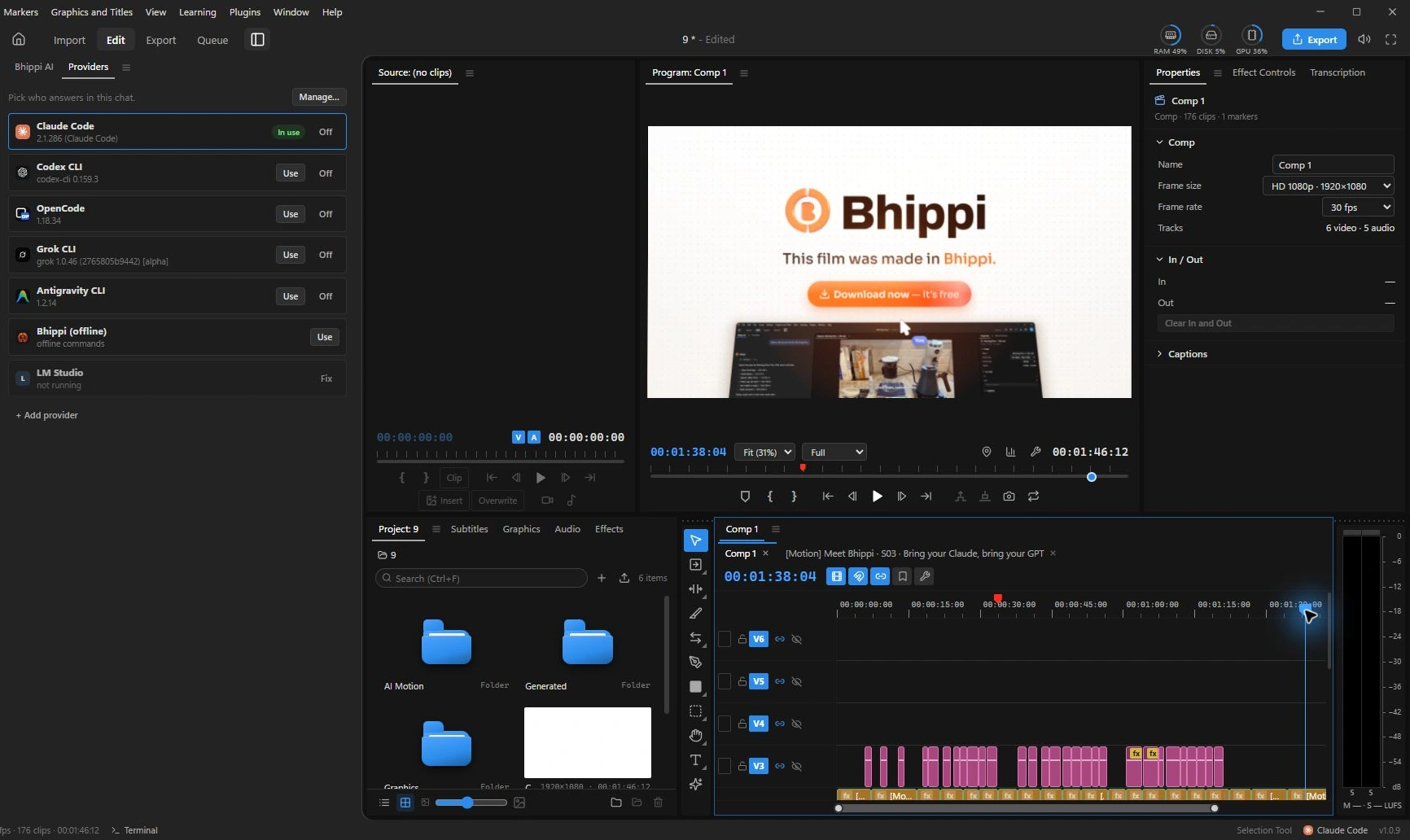
Bhippi is a Windows desktop video and motion studio with an AI editor built in. You can ask for a cut and then inspect the result on a multi-track timeline. The footage, titles and audio remain things you can adjust. Its appeal is especially clear if you want help with the repetitive first pass without giving up the editor underneath it.
The current launch offer is straightforward: claim a free tester key and download Bhippi during early access, and keep Bhippi free for life. Sign in with Google, open your account dashboard, get the Windows installer and activate with the same account. A download alone is not the account setup; make sure the key appears in your dashboard.
Bhippi lets you connect your AI providers. Their subscriptions, API bills or usage limits are separate. Local models are another option, with hardware and setup requirements. The free Bhippi license is not a promise of unlimited paid cloud inference.
Make the decision with your next revision in mind
If Premiere is already earning its keep in an established workflow, a dramatic overnight switch may solve the wrong problem. If you are paying through quiet months, avoiding a tool because of its commitment or trying to start with a smaller budget, testing an alternative is sensible.
Give the test an ordinary brief. Make a clean cut, change your mind about the opening, fix a name in the captions and deliver the file. The right editor is the one whose price and revision process you can live with after the excitement of the first demo has worn off.
Keep a renewal note beside the project ledger
Make your comparison easy to revisit. Keep a short note with the plan you chose, its commitment period, the date of the next renewal and the tasks it replaces. Add one line about how many jobs you actually finished that month. You do not need a complicated spreadsheet to notice a subscription that has stopped matching your workload.
There is a useful distinction between a tool you use occasionally and one your clients require. If a client expects a particular editable project, record that dependency as well. It may justify keeping the license even when a free editor handles your own videos. If no such requirement exists, give yourself time to test an alternative before the renewal arrives.
Finally, budget for correction time. A cheaper tool that repeatedly breaks captions or needs a second export can cost more of your working day. A fair trial includes the ordinary revision and the final delivery, not just opening the app.
FOLLOW THE EVIDENCE
Sources & notes
Checked October 1, 2026. Community posts describe individual experiences, not a representative survey. Vendor policies and pricing can change. Workflow examples are illustrative; these articles do not present a hands-on comparative benchmark. Bhippi publishes this blog and makes the editor discussed here.
- Adobe: subscription terms and refund policies Official policy
US policy; updated January 27, 2026. Check the terms for your country and plan.
- Adobe: compare Premiere plans Official pricing
Prices, taxes, promotions and billing commitments vary by region.
- Premiere community: termination fees question Community discussion
An individual cancellation question, not evidence that every subscriber has the same experience.
- Blackmagic Design: DaVinci Resolve Official product information
The vendor offers a free edition and a paid Studio edition; compare feature requirements.