Editing workflow
An AI edit only proves itself when you ask for a revision
The first render can look impressive. The second request reveals whether you still control the clips, titles, sound and story.


The first version is easy to admire. Music, captions, a fast opening and a neat final card: it looks like the AI has understood the job. Then someone says, “Keep everything, but use the other take for the second sentence and leave the logo up a little longer.”
That is when you find out what kind of tool you have. Can you change the sentence without regenerating the whole piece? Does the music stay in place? Can you inspect the caption timing? Is there a project underneath the preview, or only a finished file?
A revision is not an edge case. It is an ordinary part of making video for another person, or simply watching your own work again with fresh eyes. An editor should be judged on that ordinary task.
A render and a project answer different needs
A rendered video is a deliverable. A project is the structure that lets you change it. When a result is flattened, moving one title may require a new generation, replacing part of the video or rebuilding an overlay manually. Separate tracks and editable objects give you more direct control.
That does not make every one-click tool useless. Sometimes you need a simple clip and never intend to revise it. But if the job involves client feedback, brand rules or a sequence you will reuse, you should inspect what remains editable before committing to the workflow.
Look at the titles, captions, voice, music and source clips. Can each be adjusted independently? Can you save the project and reopen it? Can you undo a change that did not work? Those are concrete questions you can answer in a small trial.
AI gives you alternatives; you still need to compare them
VideoDiff explored ways for creators to compare AI recommendations for rough cuts, B-roll and text effects using aligned timelines, transcripts and previews. [1] The relevant idea is that generating options is only part of the work. A person also needs a clear way to inspect differences and keep the useful parts.
The study was a research prototype with a small participant group. It is not evidence that Bhippi, or every commercial AI editor, delivers a measured productivity gain. It does give a sensible principle for evaluation: the tool should help you understand the change, not just produce another attractive version.
Ask what changed between two cuts. Was a pause shortened? Was a sentence removed? Was the music replaced? If you cannot tell, the review becomes another full watch-through every time. Focused changes are easier to assess and easier to reverse.
Write revisions with a location and a boundary
“Make this better” is an invitation to reinterpret the whole video. “Move the opening title above the presenter and keep the wording” is a focused request. Name the object, say what should change and say what should stay.
ExpressEdit’s research considers language and sketches as ways to express temporal and spatial edit intentions. [2] In ordinary use, that means an annotation or selected layer can be more useful than a long paragraph describing where an object sits. If the editor supports that context, use it.
Change only the title over the second interview answer. Keep its wording and timing, move it away from the speaker’s face, and use the active brand font. Leave the source cut, captions, music and other titles unchanged. Show me the result so I can review it.
For structural revisions, save a version first. “Replace this sentence” can affect duration, B-roll and audio. It may be a small request in conversation but a larger change to the sequence. Review the joins around it and check that captions still align.

How Bhippi approaches the correction pass
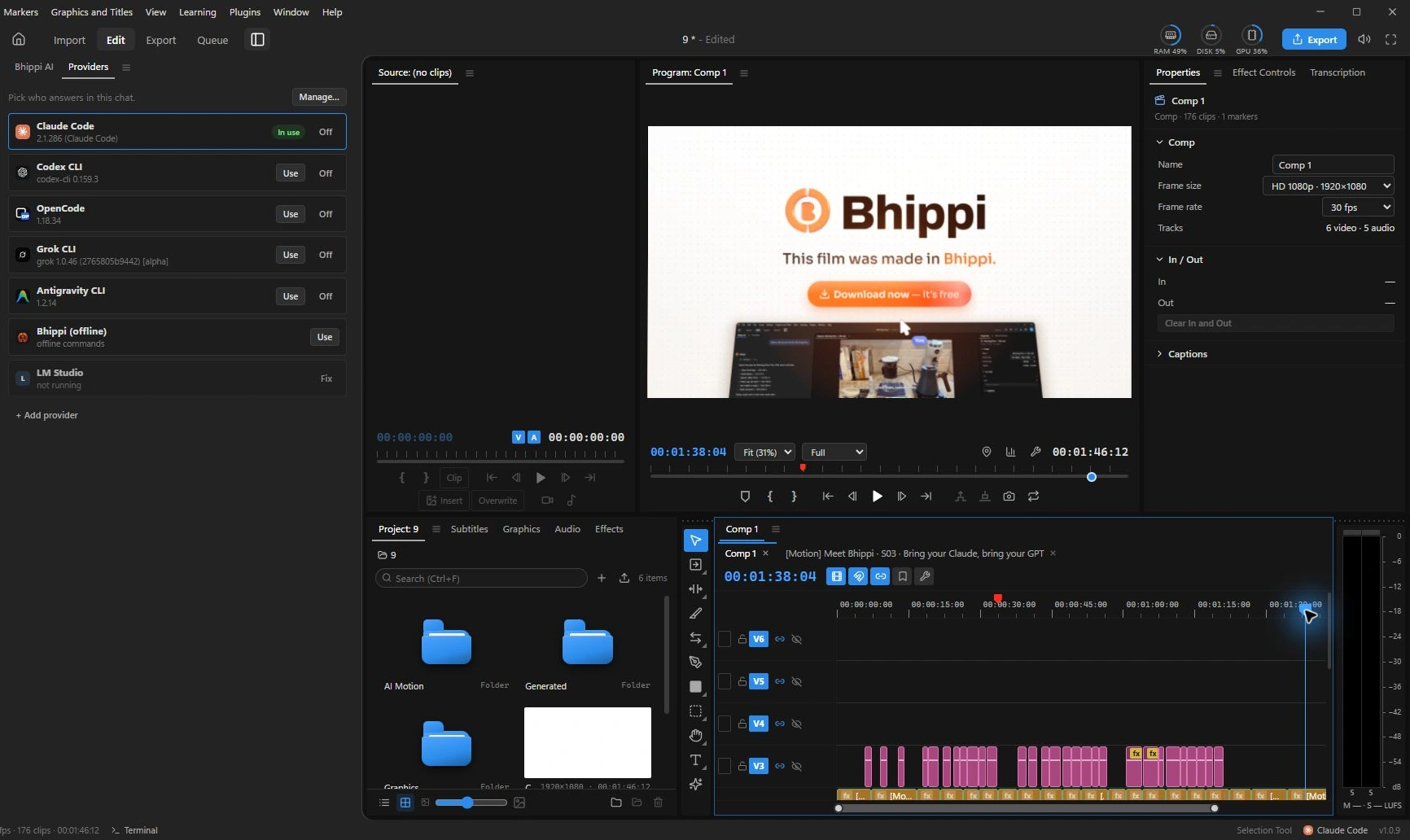
Bhippi’s AI acts through tools on an editable timeline. You can select a layer or annotate the preview and ask for a focused change. The application supports a Quick route for smaller edits as well as a fuller production workflow. [3]
The point is not that an assistant can never misunderstand you. It can. The useful property is being able to inspect the result, trim or move the relevant element manually, and undo an edit that does not help. AI suggestions and ordinary editing need to coexist in the same project.
Keep a revision small when the problem is small. If the title obscures a face, correct the title. If a transition feels abrupt, review that join. Asking for a whole new film because of one awkward moment spends more effort and gives you more material to check.
Try this before choosing an AI editor
Build a short project from footage you already understand. Include a spoken line, a title, a caption and music. Make the first export, then give yourself four ordinary requests: replace a take, fix a proper name, lower the music under one sentence and change the final card’s duration.
- Note whether each request can be made without rebuilding unrelated parts.
- Watch for captions that move out of sync after a timing change.
- Reopen the saved project and confirm the editable structure remains.
- Undo a revision and check that you can return to the earlier version.
- Export again and play the result outside the editor.
This is not a laboratory benchmark. It is a useful buying test because it resembles the work that follows a demo. You will learn whether the tool’s first impression survives the second conversation.
Keep the human decisions close to the edit
An assistant can assemble, suggest and execute. It cannot decide for you whether a sensitive joke belongs in a brand film, whether a testimonial preserves the speaker’s meaning or whether a cut makes an explanation confusing. Review those decisions in context.
Do not measure control by how often you touch the mouse. Measure it by whether you can understand, change and keep the result. A tool that saves many repetitive actions while leaving clear choices in your hands can be more useful than one that hides all of the work behind a single button.
Bhippi is available with free tester keys during early access. Claim your key and download now to keep the software free for life, then connect your AI providers if you want AI assistance. Test it with a revision as well as a first render. That is the point where an AI editor earns a place in a real workflow.
Turn feedback into a small, checkable request
A useful revision note has three parts: where the issue occurs, what should change, and how you will judge the result. “The music hides the product name at the start” is more actionable than “the sound feels wrong.” “Hold the closing card long enough to read the address” gives a clearer review target than “make the ending better.”
Collect duplicate feedback before applying it. Two reviewers may describe the same problem differently, and treating those notes as separate edits can undo a good correction. If one person asks for a shorter opening and another asks for more context, resolve the intended message before asking an assistant to execute both requests.
After each significant revision, watch the affected moment and the transitions around it. Then check the final export against the approved wording and duration. The aim is a project whose changes remain understandable, so you can come back tomorrow and finish the next request without rediscovering how the whole film was assembled.
FOLLOW THE EVIDENCE
Sources & notes
Checked October 1, 2026. Community posts describe individual experiences, not a representative survey. Vendor policies and pricing can change. Workflow examples are illustrative; these articles do not present a hands-on comparative benchmark. Bhippi publishes this blog and makes the editor discussed here.
- VideoDiff: Human-AI Video Co-Creation with Alternatives Research paper · CHI 2025
Studies comparing and customising AI recommendations with a small participant group; not a Bhippi benchmark.
- ExpressEdit: Video Editing with Natural Language and Sketching Research paper · 2024
Explores expressing edit intentions through language and spatial references.
- Bhippi: video editor workflow Bhippi product information
AI works on a multi-track timeline that can be opened, adjusted and undone.